PhotoFlow · from edited photo to online in 30 seconds
Taking out the work between "shoot edited" and "shoot online". For professional photographers working in Lightroom: a single approval delivers Instagram teasers, ceremony carousels, blog coverage, portfolio update and LinkedIn case study all at once, scheduled, published and monitored.
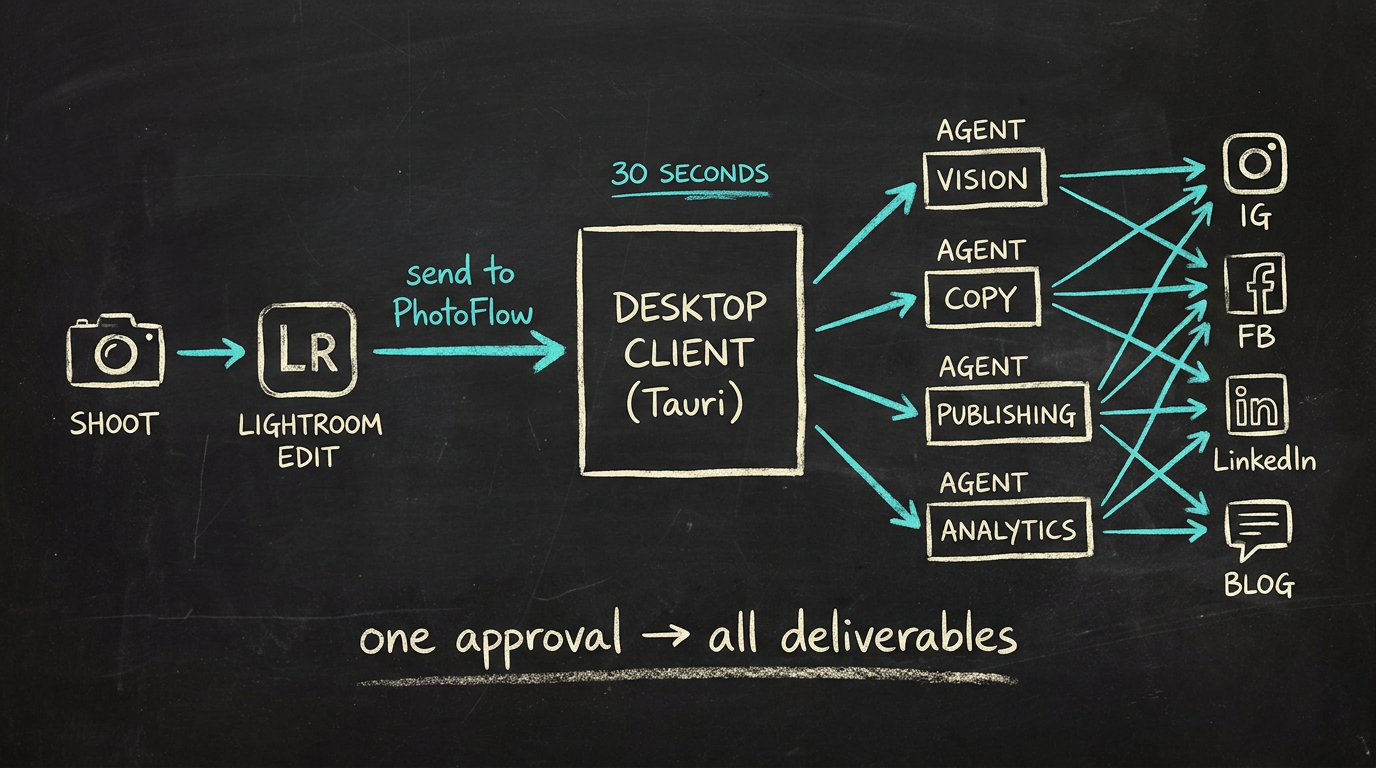
Whiteboard sketch · from shoot to deliverables in 30 seconds
What the photographer still does
Three steps:
- Take the photo
- Edit the photo in Lightroom
- Approve
Everything in between (captions, hashtags, scheduling, publishing to IG / FB / LinkedIn, blog, portfolio) is done by AI.
Core concepts
Project / Shoot is the main object. Not "posts". A project ("Wedding Lisa & Mark") is translated by AI into multiple derivatives. One approval → all deliverables ready.
Curation vs Technical QA. AI only does the objective technical assessment: sharpness, eyes-open, exposure, motion blur. The artistic selection stays entirely with the photographer via Lightroom ratings.
Toggle-first UX. All features set up once during onboarding (four screens), after that only via Settings. Defaults aggressively ON. The workflow never adds steps to what the photographer is already used to.
RAW-blind. PhotoFlow does not read RAW. Lightroom renders; PhotoFlow operates on previews and exports. Works for Canon, Fuji and every brand supported by Lightroom without special-casing.
Architecture
A hybrid setup:
| Component | Tech | Responsibility |
|---|---|---|
| Desktop client | Tauri + React + SQLite | Local: photos, projects, drafts, settings |
| Lightroom plugin | Lua (.lrplugin) | "Send to PhotoFlow", talks to the desktop client via localhost |
| Cloud component | Supabase or Cloudflare Workers + D1 + R2 | OAuth proxy, token refresh, scheduled-publish queue, App Review endpoints |
The local-first choice keeps photo data out of cloud storage unless that is necessary. The cloud only does what it has to: social-network OAuth and publish scheduling at a time when the photographer's device may be switched off.
Multi-agent
| Agent | Function |
|---|---|
| Vision | Image analysis, subject detection, mood |
| Copy | Captions, hashtags, SEO, blog |
| Publishing | Scheduling, publishing, status checks |
| Analytics | Results, reporting, improvement advice |
Four roles, one coordinator. The pattern behind a large part of ECHO recurs here: a thin router layer distributes the work and the output lands in one structured place.
Audience + API reality
Professional photographers with:
- An Adobe Lightroom Classic workflow
- An Instagram Business or Creator account (required, a technical limitation of the Meta API)
- A Facebook Page
- Optional: LinkedIn (personal or Company Page)
PhotoFlow does not support personal social-media accounts. Not a choice but a hard API limitation of Meta and LinkedIn. Better to say that up front than to discover it during onboarding.
Status
Pre-development. Vision, architecture decisions, audience validation and data model captured. Next step: scaffold
- Pipeline Core.